The ALIGN AND ARRANGE section provides tools to precisely position and order your objects.
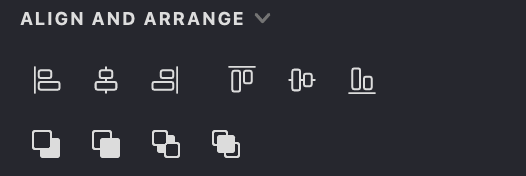
Alignment
The alignment tools help you organize objects based on their bounding boxes. When multiple objects are selected, alignment is relative to the group's bounding box. With a single object, alignment is based on the document boundaries.
 Align Right: Aligns selected objects to the right edge of the bounding box.
 Align Center Horizontally: Centers objects horizontally within the bounding box.
 Align Left: Aligns selected objects to the left edge of the bounding box.
 Align Top: Aligns selected objects to the top edge of the bounding box.
 Align Center Vertically: Centers objects vertically within the bounding box.
 Align Bottom: Aligns selected objects to the bottom edge of the bounding box.
Order Adjustment
These commands control the stacking order of objects within a group, determining which objects appear in front of or behind others.
 Move Backward: Shifts the selected object one position down in the stacking order.
 Move Forward: Shifts the selected object one position up in the stacking order.
 Send to Back: Places the selected object at the bottom of the stacking order.
 Bring to Front: Places the selected object at the top of the stacking order.